
Mobile Broadcasting APP for iPhone & iPad
Terminal Status • Live Paging • Full-Duplex Intercom • Text-to-Speech • Task Manager
T-7700PA-iOS (iPhone & iPad)
Native iOS app for Apple devices. T-7700PA-iOS transforms your iPhone or iPad into a professional broadcasting console for ITC T-7700 Series IP network audio systems. Authorized personnel can monitor terminal status, make live announcements, conduct full-duplex intercom calls, broadcast text-to-speech messages, and manage playback tasks – all with an interface designed for iOS.
App download via App Store; license activation required on T-7700RU/RP server.
| Model Number | T-7700PA-iOS |
| Product Name | Mobile Broadcasting APP for iOS |
| Category | System Management & Control Software (Mobile) |
| Platform | iOS 8.0 and higher (iPhone, iPad, iPod touch) |
| Manufacturer | ITC / Tongfang |
| License | Per-user license; requires T-7700RU/RP server |
| Deployment | Apple App Store / Enterprise In-House |
| Network | Wi-Fi, 4G/LTE, 5G (TCP/IP) |
| Core Functions | View terminal status, live paging, intercom, TTS, volume control, task management |
| Text-to-Speech | Multi-language TTS (iOS built-in voices) |
| Terminal Monitoring | Online/offline status, IP address, task progress |
| Audio Formats | MP3, WAV, M4A (playback) |
| Authentication | Username/password, server validation |
| Connection | Direct to T-7700RU1/RU2/RU3/RP server |
| Language Support | Multi-language UI (English, 中文, Español, etc.) |
| Permissions Required | Microphone, Local Network, Media Library |
| File Size | ~45 MB |
| Universal App | Optimized for iPhone and iPad interfaces |
| Relationship | iOS client for T-7700RU/RP server |
The T-7700PA-iOS is the official mobile broadcasting application for Apple devices, designed for the ITC T-7700 Series IP network audio system. It delivers the full functionality of the broadcasting management system to iPhone and iPad, enabling facility managers, security personnel, and authorized staff to control public address and intercom systems from anywhere with network access.
Built with native iOS frameworks, the app provides a fluid, responsive touch interface that follows Apple's Human Interface Guidelines. It connects directly to T-7700RU series servers (or T-7700RP) via Wi-Fi or cellular data. Whether on an iPhone for quick announcements or an iPad for detailed terminal monitoring, T-7700PA-iOS delivers enterprise-grade broadcasting power in your pocket.
Optimized for iPhone and iPad with split view, gesture controls, and support for iOS dark/light mode.
Leverages iOS built-in high-quality voices for natural-sounding announcements in multiple languages.
Dedicated iPad layout with multi-column views for simultaneous terminal monitoring and zone control.
Microphone: Required for live paging and intercom. Local Network: Required to discover and connect to T-7700 server. Media Library: Optional, for accessing audio files. No personal data is collected or transmitted.
T-7700PA-iOS requires a per-user license activated on the T-7700RU/RP server. Each licensed user can install the app on multiple iOS devices (iPhone, iPad) associated with the same Apple ID, with one active session at a time. Volume licensing via Apple Business Manager is available for enterprise deployments.
T-7700PA-iOS and T-7700PA Android are separate applications but share the same server-side license model. Users may switch platforms but require separate app downloads.
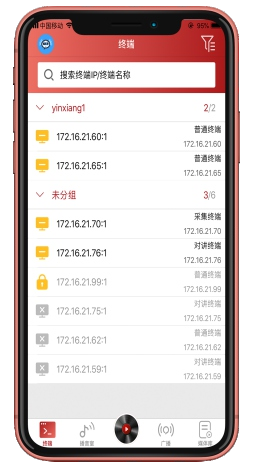
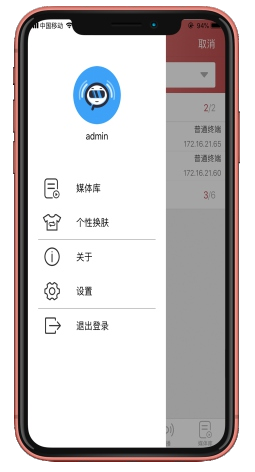
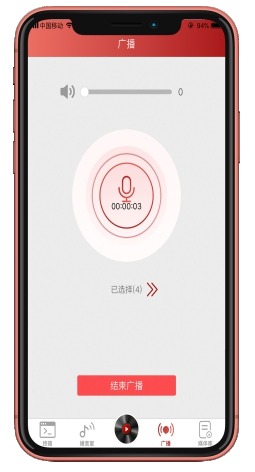
T-7700PA-iOS interface preview – optimized for iPhone and iPad
System overview, terminal status, active tasks
Zone selection, broadcast controls, gain adjustment
iOS Siri voices, multi-language support
Multi-tasking with terminal list and zone control
Full-duplex calling with paging stations
Individual/group volume with visual feedback
T-7700PA-iOS supports iOS 8.0+ and is fully optimized for all iPhone and iPad screen sizes, including iPad Pro and iPhone 15 series.
View on App Store