
Mobile Broadcasting APP for Android
View Terminal Status • Live Paging & Intercom • Text-to-Speech • Task Management
T-7700PA (Android 8.0+)
Transform your Android smartphone into a professional broadcasting console. T-7700PA is the official mobile application for ITC T-7700 Series IP network audio systems. Authorized personnel can view real-time terminal status, initiate live paging and intercom, adjust volume, create music playback tasks, and broadcast text-to-speech messages – all from the palm of their hand.
App download link provided upon software license purchase.
| Model Number | T-7700PA (Android) |
| Product Name | Mobile Broadcasting APP for Android |
| Category | System Management & Control Software (Mobile) |
| Platform | Android 8.0 (Oreo) and higher |
| Manufacturer | ITC / Tongfang |
| License | Per-user license; requires T-7700RU/RP server |
| Deployment | Google Play Store / Enterprise APK |
| Network | Wi-Fi, 4G/LTE, 5G (TCP/IP) |
| Core Functions | View terminal status, live paging, intercom, TTS, volume control, task management |
| Text-to-Speech | Multi-language TTS (device's built-in engine) |
| Terminal Monitoring | Online/offline status, IP address, task progress |
| Audio Formats | MP3, WAV (playback) |
| Authentication | Username/password, server validation |
| Connection | Direct to T-7700RU1/RU2/RU3/RP server |
| Language Support | Multi-language UI (English, Chinese, Spanish, etc.) |
| Permissions Required | Microphone, Storage, Network |
| File Size | ~35 MB |
| Relationship | Mobile client for T-7700RU/RP server |
The T-7700PA (Android) is the official mobile broadcasting application for the ITC T-7700 Series IP network audio system. It extends the full power of the broadcasting management system to Android smartphones and tablets, enabling facility managers, security personnel, and authorized staff to control public address and intercom systems from anywhere on the network.
Designed for mobility and ease of use, the app provides a clean, intuitive interface optimized for touchscreens. It connects directly to the T-7700RU series server (or T-7700RP) via Wi-Fi or cellular data, ensuring operators are always connected. Whether it's a last-minute announcement, an emergency broadcast, or adjusting background music in a remote zone, T-7700PA delivers professional-grade functionality on the go.
Make live announcements from your Android device. Speak into your phone's microphone and broadcast instantly to selected zones.
Type a message and let your phone speak it. Perfect for quiet environments or pre-scripted announcements.
Create, edit, and monitor scheduled broadcasting tasks. Activate emergency presets with one tap.
Microphone: Required for live paging and intercom. Storage: Required to access audio files for playback. Network: Required for server communication. No personal data is collected or transmitted beyond system authentication.
T-7700PA requires a per-user license activated on the T-7700RU/RP server. Each licensed user can install the app on multiple Android devices but only one active session at a time. Contact ITC or Tongfang BMS for volume licensing options.
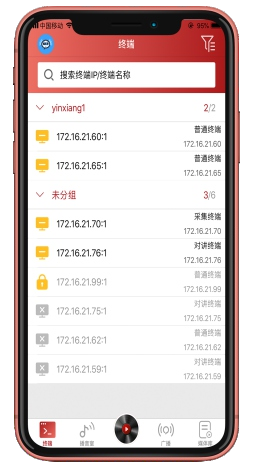
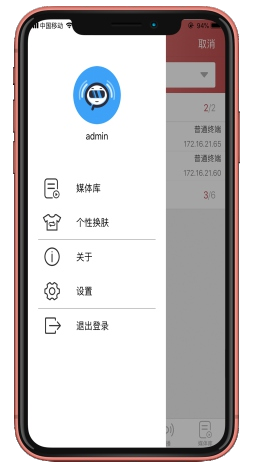
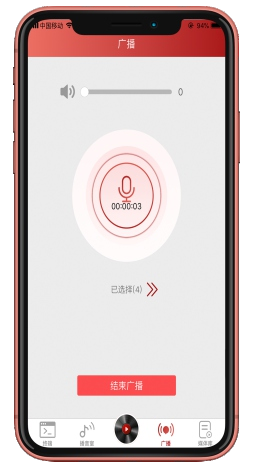
T-7700PA Android app interface preview (representative)
Real-time system overview, terminal status, active tasks
Zone selection, broadcast controls, gain adjustment
Multi-language TTS, preview, send to zones
Create, edit, delete scheduled broadcasts
Full-duplex calling with paging stations
Individual/group volume adjustment
Actual interface may vary with version updates. T-7700PA supports Android 8.0+ and is optimized for both phones and tablets.
View on Google Play